ExcaliDash
Docker Apps Rating
| U/GID | TZ | SSO/Users | Existing FS | Portable | Subfolder | Mobile |
|---|---|---|---|---|---|---|
| ❎ | ✅ | ✅👪 | ✅ | ✅ | ❌ | ✔ |
Docker compose
Gotchas
Missing Fonts and resolving it (warning about updated version)
Collab/Sharing feature
https://github.com/ZimengXiong/ExcaliDash
Install
services:
  backend:
    image: zimengxiong/excalidash-backend:latest
    container_name: excalidash-backend
    environment:

      - DATABASE_URL=file:/app/prisma/dev.db
      - PORT=8000
      - NODE_ENV=production
      - TRUST_PROXY=true.
      - JWT_SECRET=${JWT_SECRET}
      - CSRF_SECRET=${CSRF_SECRET}
      - FRONTEND_URL=${FRONTEND_URL}
      # OIDC
      - AUTH_MODE=hybrid
      - OIDC_PROVIDER_NAME=Authelia
      - OIDC_ISSUER_URL=https://auth.${DOMAIN_NAME}
      - OIDC_CLIENT_ID=excalidash
      - OIDC_CLIENT_SECRET=${OIDC_CLIENT_SECRET}
      - OIDC_REDIRECT_URI=https://draw.${DOMAIN_NAME}/api/auth/oidc/callback
    volumes:
      - backend-data:/app/prisma
    networks:
      - excalidash-network
    restart: unless-stopped
    healthcheck:
      interval: 5m
      timeout: 10s
      retries: 3

  frontend:
    image: zimengxiong/excalidash-frontend:latest
    container_name: excalidash-frontend
    ports:

      - "6767:80"
    depends_on:
      - backend
    networks:
      - excalidash-network
    restart: unless-stopped
    healthcheck:
      interval: 5m
      timeout: 10s
      retries: 3

networks:
  excalidash-network:
    name: excalidash-network
    driver: bridge

volumes:
  backend-data:
    name: excalidash_backend_data
- uses a dedicated volume to store data
- use network for container frontend and backend connectivity
Configure
The content of the .env file
- the
JWTandCSRFneed to be generated - only one frontend URL can be specified
- if using HTTPS as frontend, then access via HTTP via no longer work
- the domain name and OIDC need to match the identity provider
To exit a drawing,
- hover the mouse to the top-right to bring the menu bar
Issues
By default, imported .excalidraw files will have the wrong font. Known issue.
- manually select everything and change the font
Access
Drawings can be shared to others. Options are
- share to a specific user
- anyone with a link
- view and edit
- time based access (auto-expire)
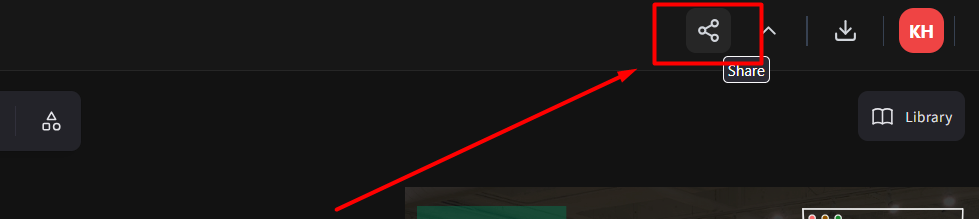
Note: anonymous user with a link (not logged in) can only change the color mode (dark/light) of drawing and cannot change the theme of the interface top bar as it requires changing the app.
SSO
These are the compose variables needed for SSO.
      - AUTH_MODE=hybrid
      - OIDC_PROVIDER_NAME=Authelia
      - OIDC_ISSUER_URL=https://auth.${DOMAIN_NAME}
      - OIDC_CLIENT_ID=excalidash
      - OIDC_CLIENT_SECRET=${OIDC_CLIENT_SECRET}
      - OIDC_REDIRECT_URI=https://draw.${DOMAIN_NAME}/api/auth/oidc/callback
AUTH_MODE- hybrid allowed both local and OIDC, other optionoidc_enforcedPROVIDER_NAME- a friendly name to be displayed in frontend as ‘Login With’- for
ISSUER_URLto use with authelia, it’s simply the base domain, not/application/excalidash, as the official documentation is for use in Authentik
Authelia
      - id: excalidash
        client_name: 'excalidash'
        client_secret: '$plaintext${{ env "EXCALIDASH_SECRET" }}'
        public: false
        authorization_policy: 'family_only'
        redirect_uris:
          - 'https://draw.{{ env "DOMAIN_NAME"}}/api/auth/oidc/callback'
        scopes:
          - 'openid'
          - 'profile'
          - 'email'
SSO Behavior
| In FB | Not in FB | |
|---|---|---|
| In Authelia | Logged in as user | Auto-provisioned as user (if enabled) |
| Not in Authelia | Local signin only or Forbidden | Forbidden |
| Each user has their own drawing folders and behave separately. | ||
| ### Access Control | ||
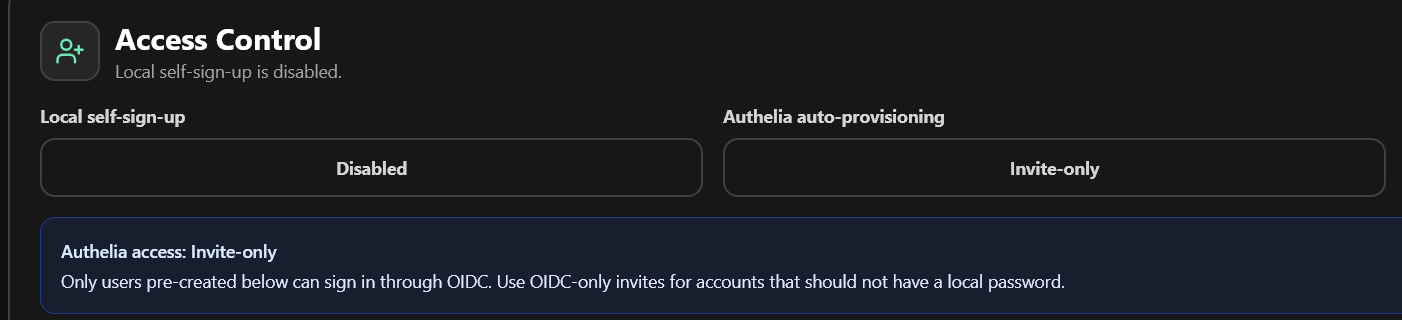 |
The behavior of SSO users differs depending on Access Control settings. The best setting for public access is disable local self-sign-up and all authentication is enforced by Authelia.
If auto-provisioning is invite-only
- match user by email, not username
- the user must be created before (with matching email)
- user role will be applied (admin/user)
- if no matching user, not allowed login even if Authelia allowed
If auto-provisioning is enabled
- user will be automatically created with user role, and matching email and name
Delete Users
DO NOT delete user from database without deleting AuthIdentity first.
Delete orphaned AuthIdentity
DELETE FROM AuthIdentity
WHERE id IN (
  SELECT ai.id
  FROM AuthIdentity ai
  LEFT JOIN User u ON u.id = ai.userId
  WHERE u.id IS NULL
    AND ai.provider = 'oidc'
);